
Everybody tells beginners to “write an ebook” like it’s a weekend errand. Then you open Canva, stare at a blank page, and immediately start Googling page sizes instead of writing. I’ve made this product a dozen times now, for myself and for clients, and the whole thing is much simpler than the internet makes it look – if you build it in the right order.
The direct answer: to make an ebook in Canva, open a new A4 or US Letter document, design 4 master pages first (cover, chapter opener, body page, offer page), write your content into those layouts, then export as a PDF Standard file with “flatten PDF” turned on so nobody can edit your text. Most beginner ebooks that actually sell are 25-50 pages and priced between $9 and $27 – not 200 pages and $3.
The market backs this up. Worldwide ebook revenue is projected to hit $15.65 billion in 2026, with the US alone accounting for about $5.51 billion. Meanwhile the creator economy crossed $290 billion in early 2026, and digital products – courses, ebooks, templates, communities – make up roughly $32 billion of it. And you’re building this in a tool 260 million people already use every month. You are not early, but you are nowhere near late.
What Is a Canva Ebook and Why Sell One?
A Canva ebook is a multi-page PDF you design in Canva and deliver as an instant download. The buyer pays, gets a link, opens the file. No shipping, no inventory, no stock.
It’s the best first digital product for three reasons:
- It’s the fastest thing you already know how to make. You have opinions and a process. That’s the product.
- It doubles as your lead magnet. Chop 8 pages off the front and you have a free download that grows your email list.
- The margin is close to 100%. Build it once, sell it forever.
Compared to a course (weeks of filming) or a digital planner (hundreds of hyperlinked pages), an ebook is the shortest path from “I know something” to “someone paid me for it.”
How Do You Make an Ebook in Canva Step by Step?
Set up your document size, design 4 master pages, write into the layouts, then export as a flattened PDF. Here’s the full workflow.
Step 1 – Set the Right Document Size
In Canva, click Create a design > Custom size, then pick one:
- A4 (210 x 297mm) – use this if your audience is outside the US
- US Letter (8.5 x 11in) – use this if your audience is mostly US-based
- 1920 x 1080px landscape – only if you know people will read it on a laptop and never print it
Pick portrait A4 or Letter unless you have a strong reason not to. Some buyers print their ebooks, and a landscape file prints badly. If you’re stuck, US Letter is the safe default.
Do not start with Canva’s “Bound Document” type unless you actually want Canva Print physical copies. It adds bleed and margin rules you don’t need for a digital download.
Step 2 – Design 4 Master Pages Before You Write Anything
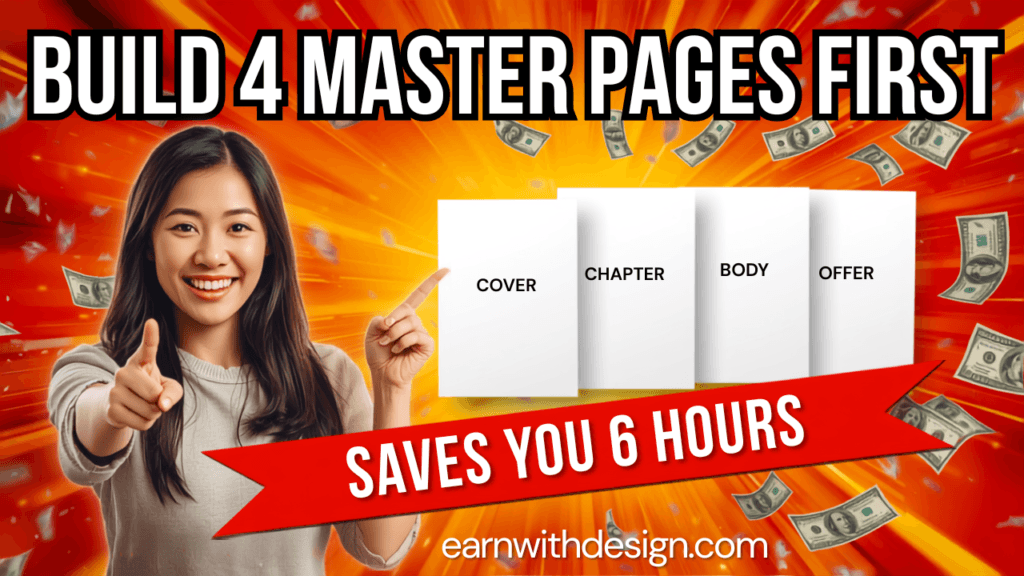
This is the step that saves you six hours. Don’t design page by page. Build these four layouts once:
- Cover – big title, subtitle, your name or shop name, one strong graphic
- Chapter opener – large chapter number, chapter title, lots of white space
- Body page – your text layout: heading, body copy, a pull-quote box, page number
- Offer page – the last page, where you point people to your other stuff
Then duplicate them as you go. Every new chapter is a duplicated opener, every new page is a duplicated body page. Your ebook stays visually consistent without you thinking about it.
Design rules that keep it looking professional:
- Two fonts maximum – one for headings, one for body
- Body text at 11-12pt, line spacing at 1.4-1.5
- Three colours maximum, and keep backgrounds mostly white with one accent colour
- Full-colour page backgrounds look cheap and eat printer ink – avoid them
For fonts, icons and patterns you can legally use in a product you’re selling, pull from a commercial-use library rather than gambling on a free font site. I get most of mine from Creative Fabrica so I never have to wonder whether an element is licensed for resale.
Step 3 – Write the Content Into the Layout
Write directly into your duplicated body pages. It feels wrong, and it works, because you can see immediately when a section is too long or too thin.
Structure that sells:
- Intro (1-2 pages) – the problem, and the outcome they get by the end
- 4-7 chapters – one idea per chapter, each with at least one action step
- A checklist or template page – this is what makes people screenshot and share it
- Offer page – what to do next
Add a Table of Contents page after your cover once the chapters are final. In Canva you can make each TOC line clickable: select the text, press Ctrl+K (Cmd+K on Mac), choose Page, and pick the destination. Do this last. Canva links to page numbers, so if you reorder pages after linking, every link breaks.
Step 4 – Add Page Numbers and a Footer
Design the page number and a small footer once on your body master page, then it carries through every duplicate. Put your website in the footer – earnwithdesign.com style – because ebooks get forwarded, and that footer is free traffic.
Step 5 – Export It Properly (Most People Get This Wrong)
Click Share > Download and choose:
- File type: PDF Standard (not PDF Print – that produces a much bigger file for no benefit on a digital download)
- Flatten PDF: ON – this locks your text so buyers can’t edit or copy your layout
- Include notes: OFF
Then open the file and actually read it on your phone. Fonts render differently in the export, and a heading that looked perfect in the editor sometimes wraps badly in the PDF.
If your file lands over 20MB, go back and compress your images before re-exporting. Big files get abandoned mid-download.
How Many Pages Should an Ebook Be?
25-50 pages is the sweet spot for a paid beginner ebook. That’s enough to feel substantial and short enough that someone actually finishes it, which is what makes them buy from you again.
Length only matters as a signal of value. A tight 30-page guide that solves one specific problem is worth more than a padded 150-page book that solves nothing in particular. If you’re at 12 pages, you probably have a lead magnet rather than a paid product – which is fine, use it that way.
How Much Should I Sell My Canva Ebook For?
Price a beginner ebook between $9 and $27. Go higher, up to $47, only when it’s outcome-driven and specific – “the exact system I used to get X” rather than “a guide to Y.”
Anything under $5 actively hurts you. A $3 ebook makes people suspicious; the same file at $17 gets taken seriously. On Gumroad, $19 and $29 are the two most common price points for a reason. On Amazon KDP the expectation is lower – $4.99 to $7.99 for non-fiction – which is why I’d rather you sell from your own storefront and keep the margin.
Quick reference:
| Ebook type | Pages | Price |
|---|---|---|
| Free lead magnet | 5-12 | $0 |
| Entry-level guide | 20-35 | $9-$17 |
| Full system / method | 35-60 | $19-$27 |
| Specialist, outcome-driven | 40+ | $37-$47 |
Where Should You Sell Your Ebook?
You have three real options, and I’d run two of them at once.
1. Etsy. Etsy has around 86.6 million active buyers in 2026, which means built-in traffic you don’t have to create. The trade-off is fees and the fact that you don’t own the customer. Great for discovery, weak for building a business. If you’re going this route, my Etsy SEO for digital products post covers how to get found.
2. Your own storefront and funnel. This is where the money actually is – you keep more per sale and you keep the email address. I run mine through Systeme.io because the free plan covers a sales page, checkout, file delivery and email automation without a separate website. That combination is genuinely hard to beat when you’re starting.
3. Your email list. The cheapest sales you’ll ever make. If you’ve already got even 200 subscribers, a plain-text email to your list will usually outsell a week of Etsy traffic.
My honest recommendation: list it on Etsy for discovery, and sell the same file through your own funnel for profit. Don’t pick one.
Build the Funnel Before You Need It
Here’s the mistake I made for a year – I’d finish a product, then scramble to build the sales page. Do it the other way around.
Before you export the final PDF, set up:
- A landing page for the free chapter (your lead magnet)
- An email opt-in that delivers it automatically
- A 4-5 email welcome sequence that ends with the paid ebook
If writing the page copy is the part that stalls you, LeadCreator drafts landing pages and lead magnet copy fast enough that “I’ll do it later” stops being an excuse. I’ve written a full breakdown of the sequence itself in my email welcome sequence post.
How Do You Market an Ebook Once It’s Live?
Turn the ebook itself into content. You already wrote it – now cut it up.
- Pinterest: make 4-6 vertical pins (1000x1500px) in Canva, one per chapter, each linking to the sales page. Pinterest is a search engine, so title your pins with what people type, not clever wordplay.
- YouTube: film one video that teaches chapter one for free and mentions the ebook in the description. If short-form is more your thing, CapCut handles the captions and cuts faster than editing in Canva.
- Email: send three emails – one about the problem, one with a sample page, one with the buy link.
- Free chapter as a lead magnet: the highest-leverage move on this list. Every download is a subscriber you can sell to for years.
https://www.youtube.com/@RachelYeong
Common Mistakes That Kill Ebook Sales
- Designing every page from scratch. Master pages exist. Use them.
- Exporting as PDF Print. Huge file, no benefit, slower download.
- Forgetting to flatten. Someone will resell your unflattened file. It happens.
- Hyperlinking before finalising page order. All links break.
- Writing 120 pages. Nobody finishes it, so nobody buys the next thing.
- Selling only on Etsy. You’re renting an audience instead of building one.
- No offer page at the end. The last page of a finished ebook is the warmest ad space you will ever own. Don’t leave it blank.
Grab My Free 30-Day Content Planner
If the writing part is where you stall, the problem usually isn’t the ebook – it’s that you don’t have a content rhythm feeding it. Grab my free 30-Day Action Content Planner for Canva. It’s a fill-in Canva file that maps one core topic per week across YouTube, Pinterest, your blog and email, so your ebook has something pointing at it every single week.
You can also grab my free templates and starter files over at lead.earnwithdesign.com. <!– Add FAQ Schema markup via Rank Math or Yoast –>
FAQ
Can you make an ebook in Canva for free? Yes. Everything in this guide works on the free Canva plan, including multi-page documents, hyperlinked table of contents and PDF export. Canva Pro adds Brand Kit, background remover and premium elements, but it isn’t required to publish and sell.
Can I sell an ebook I made in Canva? Yes, as long as you don’t sell it as an editable Canva template using Canva’s stock elements. Selling a flattened, finished PDF you designed is fine. Selling a template file that contains Canva’s licensed photos and graphics is not.
What file format should I sell my ebook in? PDF Standard with “flatten PDF” turned on. It opens on every device, keeps your fonts and layout intact, and stops buyers from editing your text.
How long does it take to make an ebook in Canva? Two to four focused sessions if you already know your topic. About 90 minutes to build the master pages, then two or three sittings to write and lay out the content.
How many pages should my first ebook be? Aim for 25-50 pages. That’s substantial enough to charge $17-$27 and short enough that people actually finish it.
Do I need my own website to sell an ebook? No. A funnel tool like Systeme.io gives you a sales page, checkout and file delivery without a website. A site helps long-term for SEO, but it isn’t a prerequisite for your first sale.
How do I stop people sharing my ebook? You can’t fully, and chasing it isn’t worth your time. Flatten the PDF, add your name and site in the footer, and treat any leaked copy as marketing. Focus on selling to the 95% who pay.