
I’ve been designing digital products in Canva for over 3 years – planners, Pinterest pins, Etsy thumbnails, lead magnets. The font I choose can literally double a click-through rate on a Pin or make a planner cover look cheap instead of premium.
But Canva has 3,000+ fonts. Most are unusable. Some are gorgeous but illegal for commercial use. A handful are gold.
Here are the 15 free Canva fonts and 10 Pro fonts I actually keep coming back to – sorted by what I use them for (Etsy listings, Pinterest, planner covers, sales pages). No theory. Just the names, what they look like, and where to use them.
How I Pick Canva Fonts (the 30-second rule)
Before I touch a font in Canva, I ask 3 questions:
- Will it read at thumbnail size? Pinterest pins and Etsy listings get scrolled at small sizes. If a font goes blurry at 300px, it’s out.
- Does it match the buyer, not me? A planner for busy moms needs friendly + clean. A digital marketing course needs bold + modern.
- Is it commercial-use safe? Some Canva fonts have restrictions. (Covered below.)
If a font passes all 3 in under 30 seconds, I use it. If it doesn’t, I move on. No agonizing.
15 Best FREE Canva Fonts (With Use Cases)
For Headlines & Thumbnails
1. Glacial Indifference Clean, modern sans-serif. My go-to for Etsy thumbnails and Pinterest pin headlines. Works for almost any niche.
2. Anton Heavy, condensed display font. Use for bold Pinterest pin headlines that need to STOP the scroll. Don’t use it for body text.
3. League Spartan Geometric sans-serif with strong character. Good for digital product covers in tech, business, or productivity niches.
4. Bebas Neue Tall, narrow caps-only font. Classic for Pinterest pins, YouTube thumbnails, and bold headers. Slightly overused, but for a reason.
5. Oswald Condensed sans-serif. Similar use case to Bebas but with lowercase. Works for blog post graphics.
For Body Text & Subheadings
6. Open Sans The most readable free font in Canva. Use for body copy on sales pages, ebook interiors, and digital planner content.
7. Lato Clean, friendly sans-serif. Excellent body text alternative to Open Sans. Works in lifestyle, wellness, and creator niches.
8. Montserrat Versatile sans-serif. Works as both headline (bold) and body (regular). When you’re not sure, default to Montserrat.
9. Poppins Modern, rounded sans-serif. Friendly without being childish. Great for coaching, wellness, and online business niches.
10. Quicksand Soft, rounded font. Use for products targeting moms, kids, or lifestyle audiences.
For Script & Decorative
11. Alex Brush Elegant script font. Use sparingly – for accent words on planner covers or wedding-related products.
12. Great Vibes Flowing calligraphy script. Better for premium-feel covers. Pair with a clean sans-serif like Montserrat.
13. Pacifico Casual handwritten script. Use for fun, friendly products – kids printables, casual lifestyle.
14. Caveat Handwritten style, but readable. Good for testimonials, highlights, or “personal note” sections on sales pages.
15. Playfair Display Elegant serif with sharp contrast. Use for premium digital products, course covers, and feminine business branding.
10 Best Canva PRO Fonts Worth the Subscription
If you sell digital products, Canva Pro pays for itself. These 10 fonts alone justify the subscription.
1. Recoleta – Modern serif with personality. My #1 pick for premium planner covers.
2. Brittany Signature – Hand-lettered signature script. Perfect for course brand logos.
3. Larken – Elegant serif. Looks expensive. Use for luxury or coaching brands.
4. Made Evolve Sans – Bold modern sans-serif. Great for digital marketing and business niches.
5. Canva Sans – Canva’s own font. Clean, readable, and never goes out of style.
6. Halimun – Modern script. Use for premium templates and ebook covers.
7. The Seasons – Classic serif. Editorial feel – good for content creators and bloggers.
8. Quincy CF – Refined serif. Use for premium feminine brands.
9. Beloved Sans – Friendly humanist sans-serif. Great for wellness, coaching, lifestyle.
10. Magnolia Script – Elegant calligraphy. Use sparingly for accent text.
Want to start with Canva Pro free for 30 days? [Try Canva Pro here] – (insert your affiliate link if you have one, or remove)
Canva Font Pairings That Sell
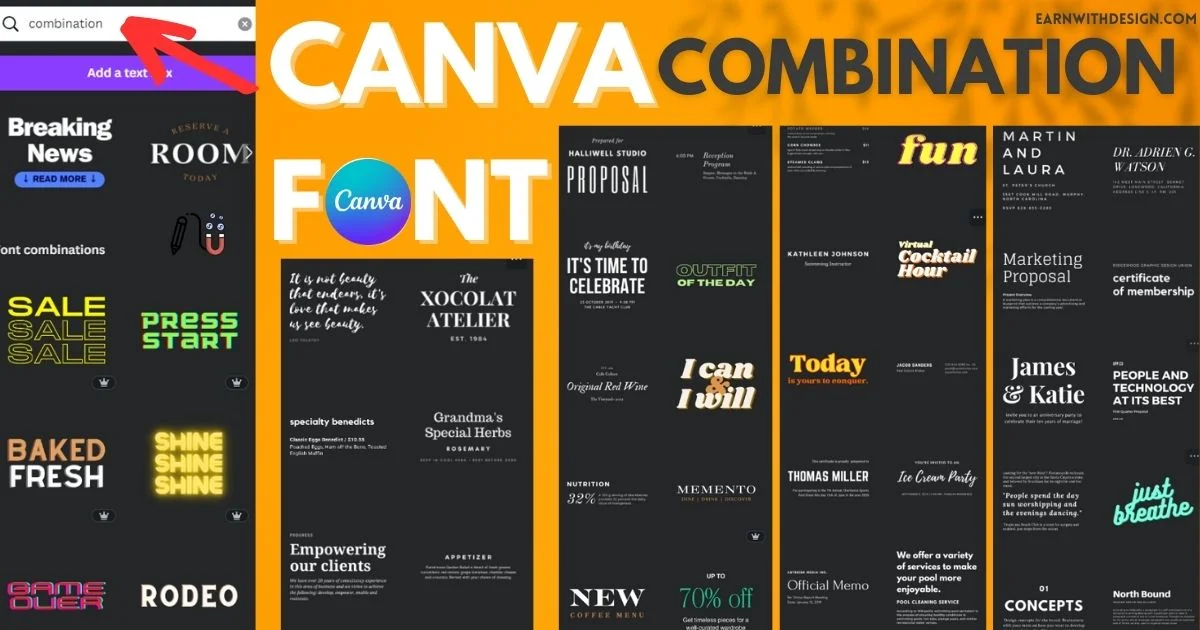
3 pairings I use on repeat:
For Etsy planner covers: Playfair Display (headline) + Lato (body) For Pinterest pins: Anton (headline) + Open Sans (body) For sales pages: Montserrat Bold (headline) + Montserrat Regular (body)
Rule: One font is the star. The other supports. Never two display fonts together.
How to Upload Your Own Fonts to Canva (Pro Only)
- Find a commercial-use font (I get mine from Creative Fabrica)
- Download in
.ttfor.otfformat - In Canva, go to Brand Kit → Brand Fonts → Upload a font
- Drag your font file in
- It now appears in the font picker on any design
Heads up: only Canva Pro lets you upload fonts. Free Canva users have to stick with the built-in library.

Get your FREE Best 15 Canva Fonts Combinations for Small Business Owners
Canva Font Licensing for Etsy & Commercial Use
Yes – you can use Canva fonts in products you sell on Etsy, including:
- Digital planners
- Printables
- Pinterest templates
- Course graphics
- Ebook covers
The one rule that trips people up: You can’t sell the font itself, or use Canva to create a logo that you then trademark. Everything else is fair game.
For full official rules: Canva’s licensing page
Incorporating Personal Touch by Uploading Custom Fonts into Canva
How to Add Your Fonts to Canva?
Today, personal branding has become more critical than ever. More is needed to have a visually appealing design; it should reflect your unique identity and style. One way to achieve this is by incorporating custom fonts into your Canva designs.
Canva, a popular graphic design tool, allows users to upload and use external fonts in their designs. This feature opens up a world of possibilities for adding a personalized touch to your creations.
To upload custom fonts to Canva, follow these easy steps:
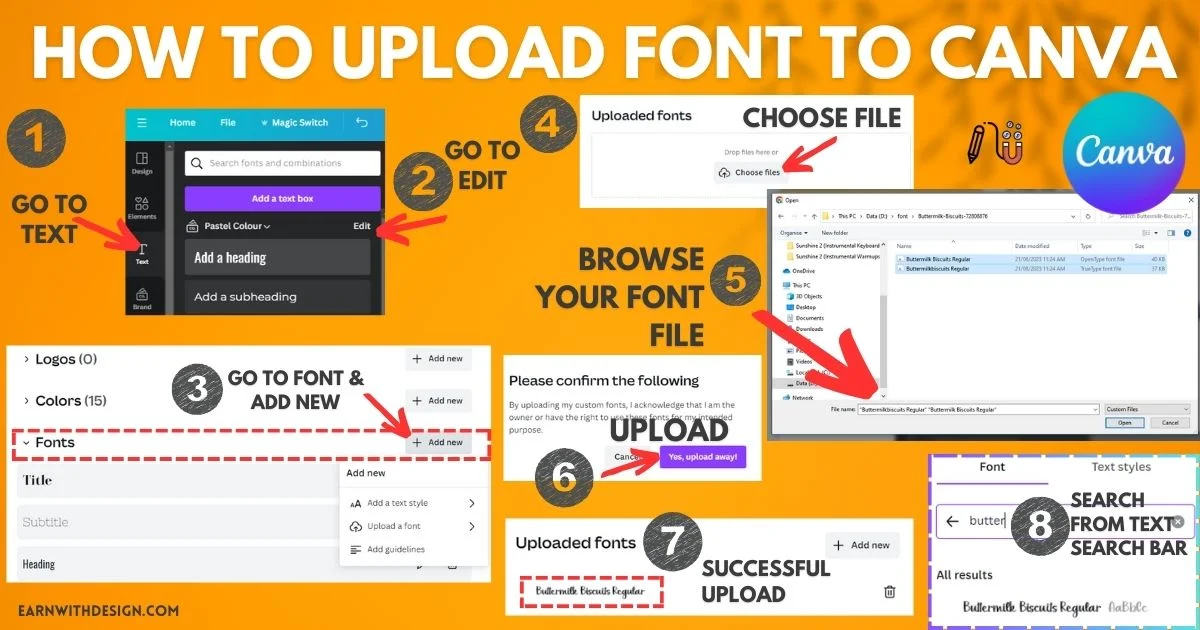
- Choose the font(s) that align with your brand identity or desired aesthetic. (You can find custom fonts on marketplaces like Creative Fabrica or Creative Market.)
- Ensure that the font files are in a supported format (typically .ttf or .otf).
- Open Canva and navigate to the “Text” tab.
- Go ahead and click on the menu next to where you choose your font at font selection options.
- Select “Upload a font” and browse for the font file on your computer.
- Once uploaded, you can access your custom fonts under the “Your Uploads” section.
By uploading custom cool fonts into Canva, you can seamlessly integrate your branding elements into your designs. Whether using a fancy script font for your logo or picking a cool font for your headings, this customization lets you shine and leave a lasting impression.
Remember, adding personal touches through custom fonts enhances visual appeal and creates consistency across all of your brand materials – from social media graphics to presentations and beyond.
Guide to Finding Your Unique Branding Typeface
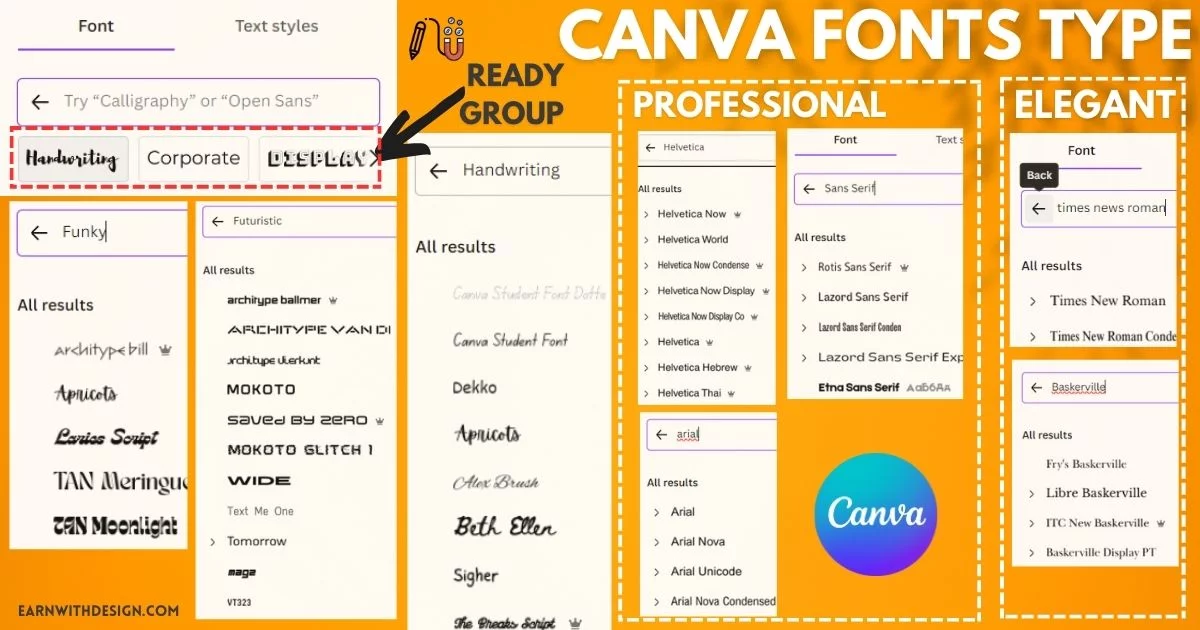
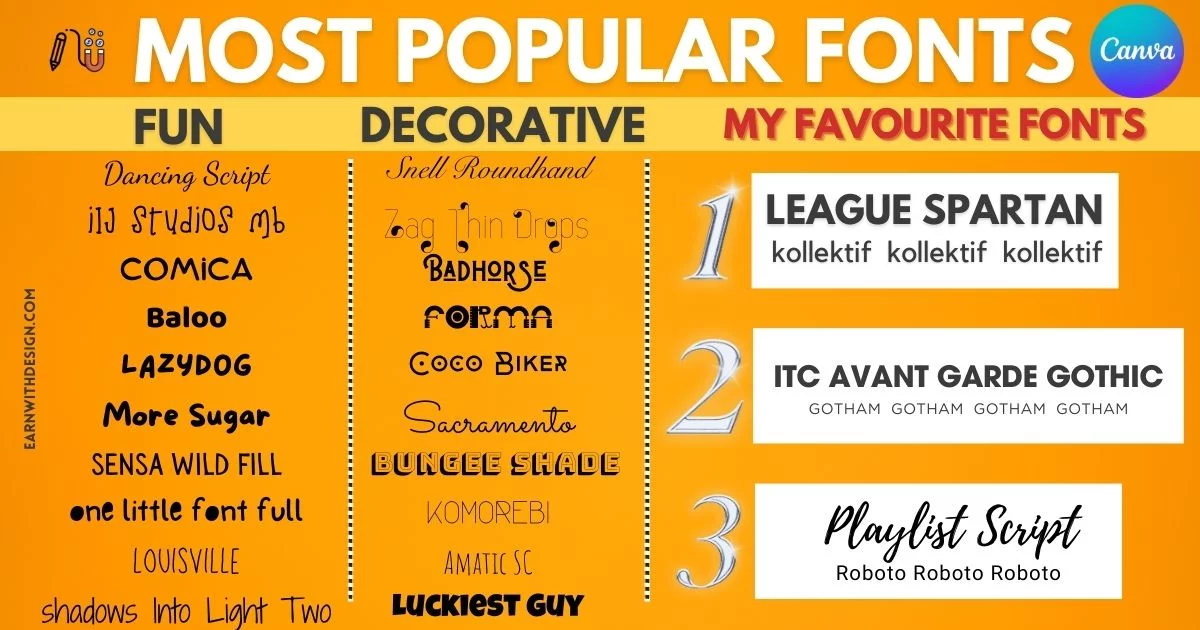
Here’s a summary of font types that can speed up your journey to find your unique branding Canva fonts:
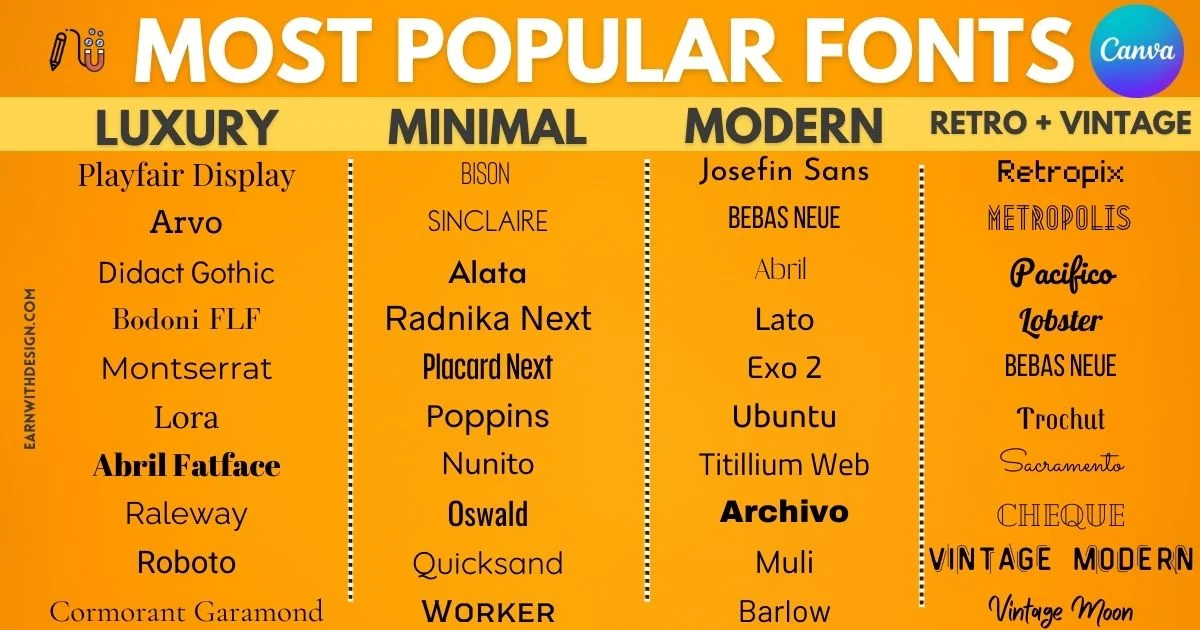
- Most Popular Luxury Fonts
- Nice Minimalist Fonts
- Modern Fonts
- Best Retro + Vintage Fonts
- Fun fonts
- Decorative font
- Tips for my Favorite fonts
Canva fonts Additional Design Feature
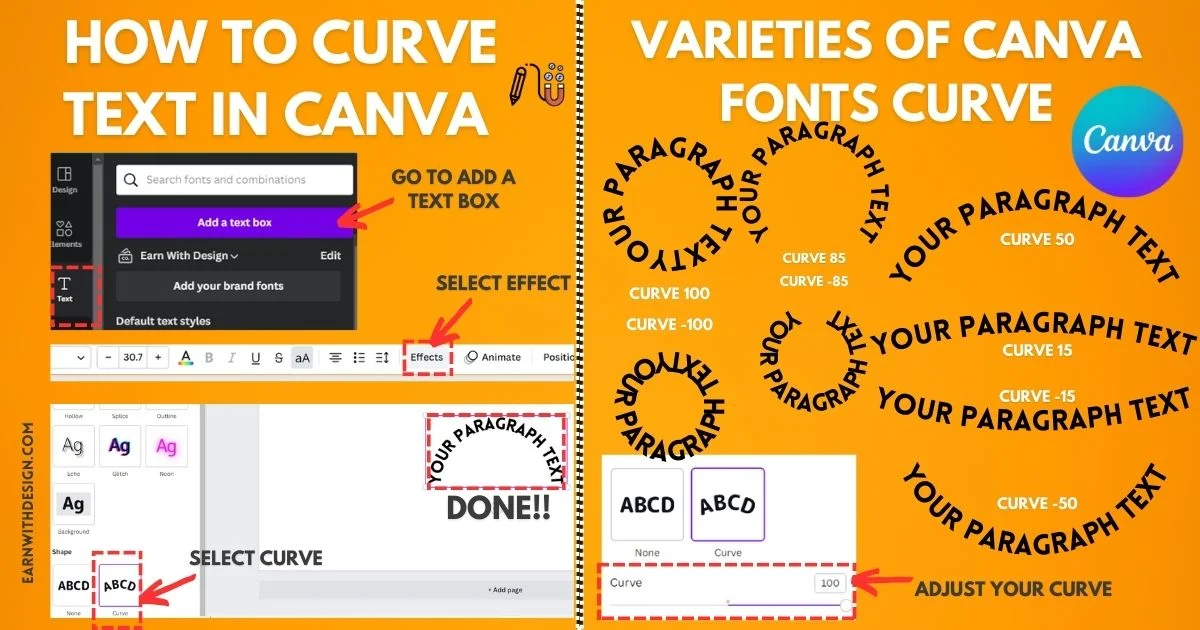
- One cool feature that Canva provides is the ability to curve text. By curving or arching your text in Canva, you can add an elegant and dynamic element to your designs.
- So, how to curve text in canva? It’s as simple as selecting the text box, clicking on the “Effects” tab, and choosing the “Curved” option. This allows you to create visually appealing designs that stand out.
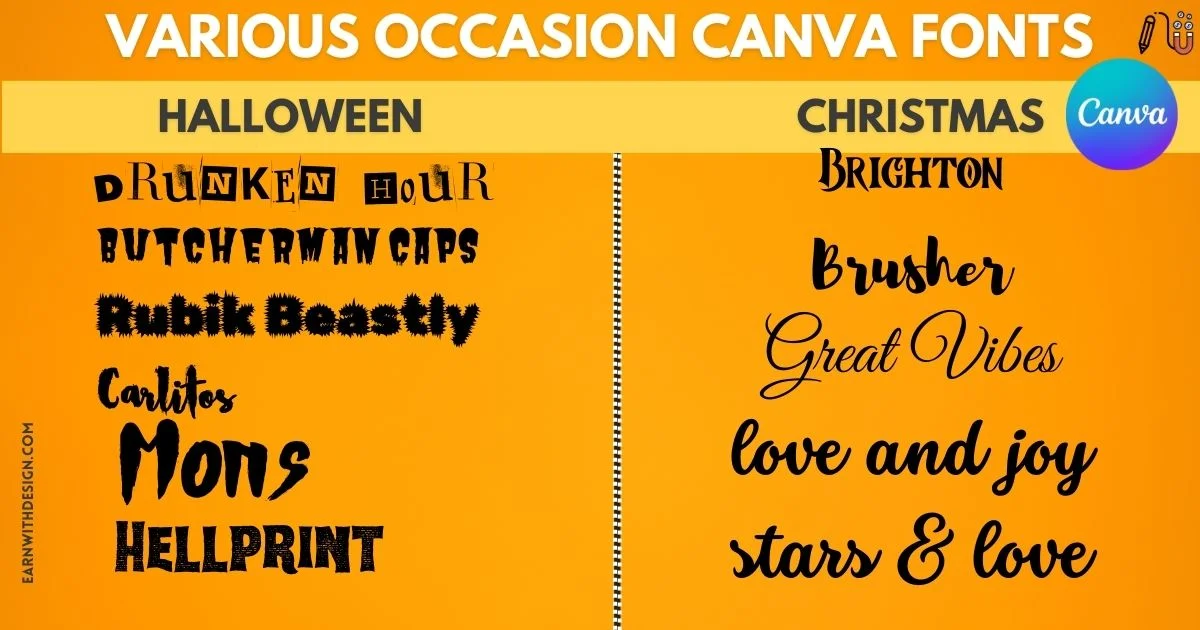
- Canva has a diverse collection for every occasion. For those seeking spooky vibes for Halloween-themed projects or events, Canva offers a variety of Halloween-inspired fonts that will give your designs an eerie twist.
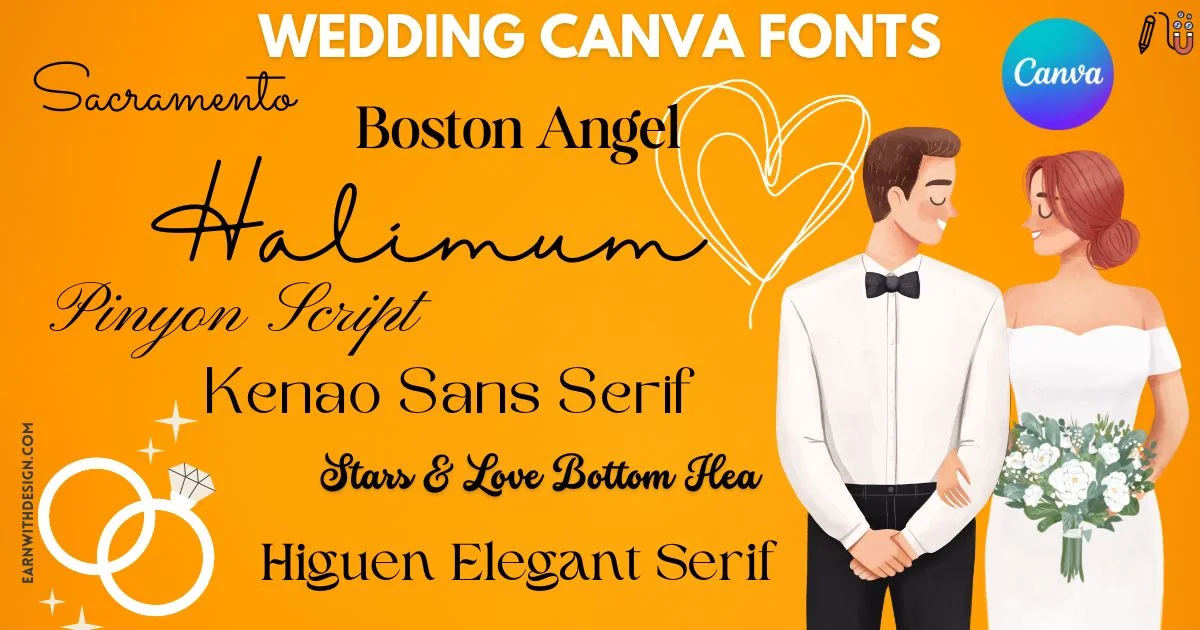
- Are you planning a wedding? Canva has curated some of the best wedding fonts for creating beautiful invitations, save-the-date cards, and more. These fonts range from elegant calligraphy styles to classic serif and sans-serif options.
Conclusion: Boost Your Online Success with the Perfect Top Canva Fonts
Pick 2-3 fonts from this list, stick with them across all your products, and your brand will look 10x more professional than someone using a different font for every design.
If you sell on Etsy, my top 3 freebies to start with: Glacial Indifference + Lato + Playfair Display. That trio alone covers thumbnails, body copy, and premium accents.
Want my exact Canva templates I use for Etsy listings? [Link to your shop or freebie opt-in]
Canva Fonts FAQ
Can I download Canva fonts to use outside Canva? No, not directly. But many free Canva fonts (like Montserrat, Lato, Open Sans) are also free on Google Fonts – just search and download from there.
What’s the best Canva font for an Etsy shop? For thumbnails: Anton or Bebas Neue (bold, readable at small sizes). For inside the product: Lato or Open Sans.
Are Canva Pro fonts worth it? If you sell digital products, yes. The font library alone justifies the subscription, plus you get background remover, brand kit, and 100M+ stock photos.
Can I use Canva fonts on a logo I want to trademark? No. Canva’s license doesn’t allow trademarking designs made with their fonts.
How many fonts should I use in one design? Two. Maximum three. Any more and the design looks chaotic.